
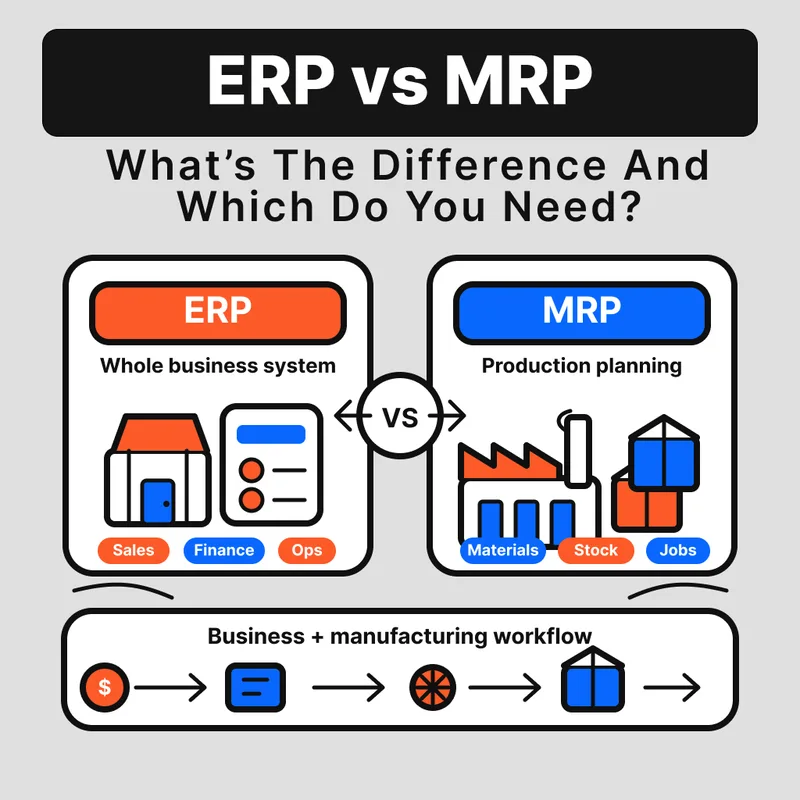
ERP vs MRP: What's the Difference and Which Do You Need?
MRP plans materials from a production schedule. ERP is a full business platform that includes MRP. Here's how to choose the right system for your shop.
If you are comparing ERP vs MRP, the short answer is that ERP contains MRP. They are not competing alternatives. MRP is a planning methodology. ERP is the wider business platform it often lives inside. And for a lot of small manufacturers, neither is the right starting point.
Key Takeaways
- MRP calculates material requirements from a production schedule and BOM. It is push-based: a demand forecast drives component orders.
- ERP is a superset of MRP. It adds financials, HR, CRM, and cross-department reporting on top of production planning.
- Kanban is a pull-based replenishment method. It does not need a BOM or forecast, and it works better than MRP for consumables and high-turnover parts.
- Most manufacturers under 50 people do not need full ERP. A production scheduling tool plus kanban covers most of what they actually need on the floor.
- MRP and kanban can run together. MRP handles planned production runs; kanban handles the floor-level replenishment that feeds those runs.
What is MRP in manufacturing?
MRP, or Material Requirements Planning, calculates what materials you need, in what quantities, and when you need them, based on a production schedule and a bill of materials (BOM). It works by exploding demand from the top down: a finished-goods schedule drives component requirements, which drive purchase orders and work orders timed to supplier lead times. ("Exploding" the BOM just means breaking the finished product down into every component and sub-component it takes to build.)
The logic is straightforward. You tell the system what you plan to build. It looks at your BOM, checks current inventory levels, factors in lead times, and tells you what to order and when. That output is a requirements schedule, a set of planned purchase orders, and a set of work orders.
MRP works well when your BOM is stable, your production runs are scheduled in advance, and your suppliers are reliable. It struggles when demand changes fast or forecasts are inaccurate, because it will push orders based on a plan that no longer reflects reality. Excess inventory and rush orders are the typical failure modes.
What is ERP in manufacturing?
ERP, or Enterprise Resource Planning, is a full business-management platform that extends MRP to cover every major function in the company. A manufacturing ERP typically includes production planning (often MRP or MRP II as a module), financials and accounting, purchasing, sales-order management, HR and payroll, and sometimes CRM.
The key point is that ERP contains MRP. You do not choose between them. When you buy an ERP system, you are buying a platform that includes production planning as one of its modules, alongside every other business function. A 90-person fabrication shop that moves to ERP is not replacing MRP, it is putting MRP inside a larger system that also handles invoicing, payroll, and customer orders.
The tradeoff is cost and complexity. A mid-market ERP implementation typically takes 6 to 18 months and costs more than most small manufacturers expect, including licensing, implementation, and training. For a shop under 50 people with one location, ERP is often over-specified for what the floor actually needs.
How does ERP differ from MRP?
The core ERP vs MRP difference is scope. MRP is a single function: it plans material requirements. ERP is a platform that includes MRP plus every other business function. MRP is a planning methodology. ERP is the system of record for the entire business.
The table below shows how MRP, ERP, and kanban compare across the dimensions that matter to a small or mid-size manufacturer.
| Dimension | MRP | ERP | Kanban |
|---|---|---|---|
| Scope | Material requirements planning | Full business management | Floor-level replenishment |
| Planning approach | Push (forecast-driven) | Push (includes MRP module) | Pull (consumption-triggered) |
| Data required | BOM, production schedule, lead times | BOM, financials, HR, customers, suppliers | Reorder point, replenishment quantity per card |
| Best for | Planned production runs with stable BOMs | Multi-department operations, 50+ staff, financial reporting requirements | Consumables, MRO, high-turnover parts, variable demand |
| Cost complexity | Moderate (standalone MRP tools exist) | High (license + implementation + training) | Low (minimal setup, no forecast dependency) |
MRP and ERP share the push-based planning assumption. Kanban sits outside that model entirely. It does not plan from a forecast; it responds to what actually happens on the floor. For a closer look at what happens when both systems fail to catch a gap, see the top causes of stockouts in a manufacturing environment.
Does ERP replace MRP?
No. ERP does not replace MRP; it includes it. When a manufacturer moves from a standalone MRP tool to an ERP system, the MRP module comes along for the ride. The production-planning logic is still there, inside the broader platform.
This matters because the question manufacturers should be asking is not "should we get ERP instead of MRP?" The real question is whether they need the additional modules that ERP adds: financials, payroll, CRM, multi-site inventory. Those are the things MRP does not do.
If a 40-person CNC job shop is running a standalone MRP tool and it is working, switching to full ERP is a significant project. The only reason to do it is if the non-MRP modules are generating enough value to justify the cost and disruption.
What does Kanban replace?
Kanban replaces MRP for floor-level replenishment of parts that do not need a production schedule to manage. Consumables, MRO items, and variable-consumption goods (fasteners, cutting tools, welding wire, abrasives) — any high-turnover part with variable demand — are better managed with a pull signal than a push plan.
Here is why. MRP requires an accurate BOM and a reliable demand forecast to generate a useful plan. For a fastener bin on a weld station, neither of those inputs is worth maintaining. Demand fluctuates. The BOM entry ages out. You end up either over-ordering to cover variance or running out because the forecast was wrong. A two-bin kanban system on that same fastener bin triggers replenishment the moment the first bin empties, with no forecast required.
That is exactly how Arda runs this layer: a card sits at the reorder point in the bin, and when a worker reaches it they scan it and the reorder fires. Nobody counts the bin, and there is nothing new for the floor to learn.
For the parts that do have a stable BOM and a planned schedule, MRP is still the right tool. Kanban is not a replacement for production planning. It is a replenishment method for the parts that feed the floor, not a way to schedule finished-goods production.
Learn how pull-based replenishment works at the bin level in this guide to the two-bin kanban system.
Which system does a small manufacturer need?
Small manufacturers need the simplest system that covers their actual gaps. A job shop with 15 people does not need ERP. A fabricator with 90 people, three product lines, external auditors, and a second location probably does.
Use this as a rough guide:
You likely need MRP (standalone) if:
- You have a defined BOM and scheduled production runs
- You need to plan component orders in advance based on a production schedule
- Your supplier lead times are predictable enough to plan against
- You have fewer than 50 staff and no need for financials
You likely need ERP if:
- You have 50 or more staff and multiple departments that need to share data
- You have external financial reporting requirements (audit, bank covenants, investors)
- You operate across multiple locations or legal entities
- You have outgrown spreadsheets and standalone tools across purchasing, finance, and production
You may not need either if:
- Your production is largely make-to-order with short lead times
- Most of your inventory-management problem is consumables and MRO, not planned production
- You are under 25 people and the bottleneck is floor visibility, not planning
For most manufacturers under 50 people, a production scheduling tool plus kanban for floor replenishment covers the majority of what they actually need. That floor-replenishment layer is exactly what Arda handles: cards in the bins that trigger a reorder when stock runs low, with no forecast to maintain and no BOM entry to keep current. If you are weighing actual tools, see our breakdown of the best small-business ERP alternatives for manufacturers. Full ERP comes later, when the business complexity genuinely requires it, not before.
Can you use MRP and kanban together?
Yes, and for most mid-size manufacturers this is the right model. MRP handles production planning. Kanban handles the floor-level replenishment that feeds those production runs. They do not compete; they operate at different levels of the supply chain.
Here is how it works in practice. A 40-person CNC job shop runs MRP to schedule its planned jobs. The MRP system looks at the production schedule, explodes the BOM, and generates purchase orders for raw stock and planned components. Meanwhile, the same shop runs kanban for fasteners, cutting inserts, coolant, and tooling. Those items do not live in the BOM. They are consumed continuously across multiple jobs, and their replenishment is triggered by a bin-empty signal, not a production plan.
The benefit of the hybrid approach is that each method does what it is actually good at. MRP is accurate for planned, BOM-driven components where lead time matters. Kanban is accurate for high-turnover, variable-demand items where a forecast would be wrong before the ink dries. Running both means fewer stockouts on the floor without inflating your MRP data-maintenance burden.
See how to set the kanban reorder point for parts that sit outside your MRP plan.
FAQ
What does MRP stand for? MRP stands for Material Requirements Planning. It is a push-based planning method that calculates what materials to order and when, based on a production schedule and a bill of materials.
What is MRP II? MRP II (Manufacturing Resource Planning) extended the original MRP concept to include capacity planning, shop-floor control, and financial planning. It is the predecessor to modern ERP. Most ERP systems for manufacturers are built on MRP II logic.
Can a small manufacturer skip ERP entirely? Yes. Many manufacturers under 50 people run successfully on a combination of standalone scheduling tools and kanban for floor replenishment. ERP makes sense when the business complexity, headcount, and financial reporting requirements justify the investment.
What is push vs pull in manufacturing? Push systems, like MRP, produce or order materials based on a forecast or production schedule. Pull systems, like kanban, replenish materials based on actual consumption. Push works well for planned production. Pull works well for consumables, MRO, and high-variability parts.
What is kanban and how does it differ from MRP? Kanban is a pull-based replenishment method where a physical or digital signal triggers restocking when a bin reaches its reorder point. Unlike MRP, kanban does not require a BOM, a production schedule, or a demand forecast. It responds to what is actually consumed on the floor, making it more reliable for parts with variable demand.
When should I use kanban instead of MRP? Use kanban for consumables, MRO items, fasteners, tooling, and any part with high turnover and variable demand. Use MRP for planned components that are BOM-driven, have predictable lead times, and are scheduled in advance as part of a production run. Many manufacturers use both simultaneously.
What are the main limitations of MRP? MRP relies on forecast accuracy. If demand changes or the BOM is outdated, the system generates incorrect requirements, leading to excess inventory or shortages. It also requires significant data maintenance to keep BOMs, lead times, and inventory records current.
Try Arda on the parts that run out most.
Print cards, put them at the stock point, scan when you pull. It augments your ERP, it doesn't replace it.
Rossmonster reports 50% less time spent ordering and 95% of stockouts eliminated.
Related reading
ERP Inventory Management: Where It Shines and Where It Fails
ERP inventory management excels at planning but struggles on the shop floor. Learn where ERPs fail, the hidden costs, and how Lean and Kanban fill the gaps.
Mar 20, 2026Read article
Kanban vs. ERP: How Should You Manage Your Inventory?
Kanban vs. ERP — which system fits your factory? Compare pull vs. push inventory management, see when to combine both, and find the right approach for your operation.
Mar 20, 2026Read article
5 Best Kanban Inventory Software for Manufacturers in 2026
Find the perfect Kanban inventory software for your shop floor. From simple hybrid tools to full e-Kanban systems, here are the top 5 picks for 2026.
Nov 13, 2025Read article